Your WhatsApp conversations are happening. But are they structured, visible, and actually working for your business?
Most businesses using WhatsApp are doing so reactively — responding when messages come in, hoping nothing falls through the cracks. There’s no visibility, no structure, and no real operational system behind it. That changes with ChatWorks.
We’ve built the ChatWorks Portal — a purpose-built management platform that turns your everyday WhatsApp activity into a fully operational, trackable, and scalable business system. Here’s what’s inside.
1. Live Dashboard Visibility — Know What’s Happening Right Now
The moment you log into the ChatWorks Portal, you get an instant overview of everything that matters. The Dashboard gives you real-time visibility across your entire WhatsApp operation — no digging required.
At a glance, you can see your total contacts, how many have opted in or opted out, how many unassigned messages are waiting, how many messages are awaiting reply, and the number of active conversations currently in progress. This kind of live operational insight means your team is always informed, never blindsided, and able to act fast.
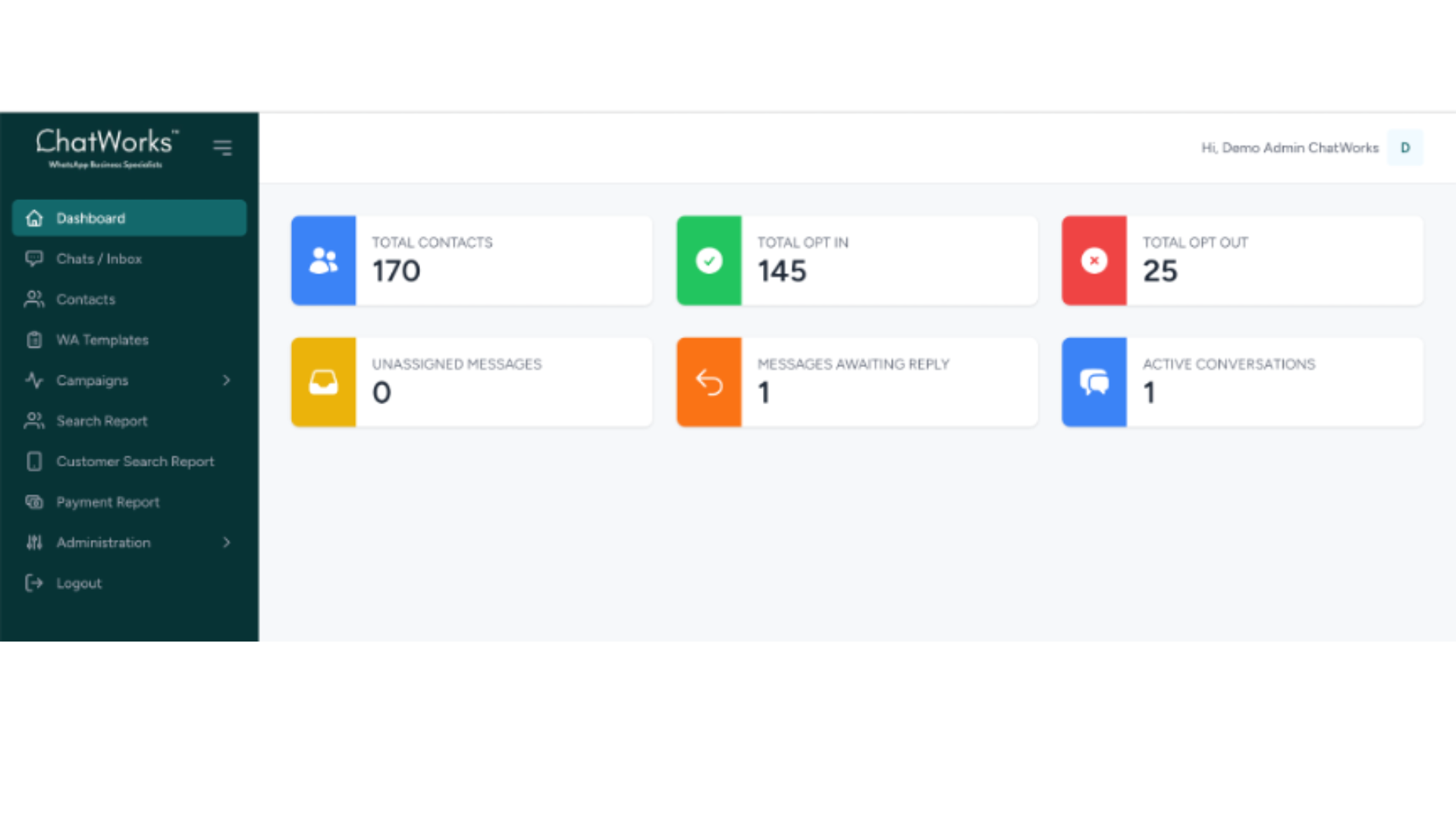
This isn’t a static report you pull at the end of the week. It’s a live operational command centre that gives business owners and team managers the visibility they’ve always needed but never had with standard WhatsApp.
2. Smart Contact Management — Key Information Without the Extra Clicks
Managing contacts in standard WhatsApp is a nightmare the moment your list grows beyond a few dozen people. The ChatWorks Contact Management module solves this entirely.
Contacts are displayed in a clean, structured list with controlled column reporting — showing you the customer name, country code, phone number, assigned salesman, and opt-in status directly in the list view. You don’t need to open each contact to get the information you need. You can also search, filter, and adjust rows per page to suit how your team works.
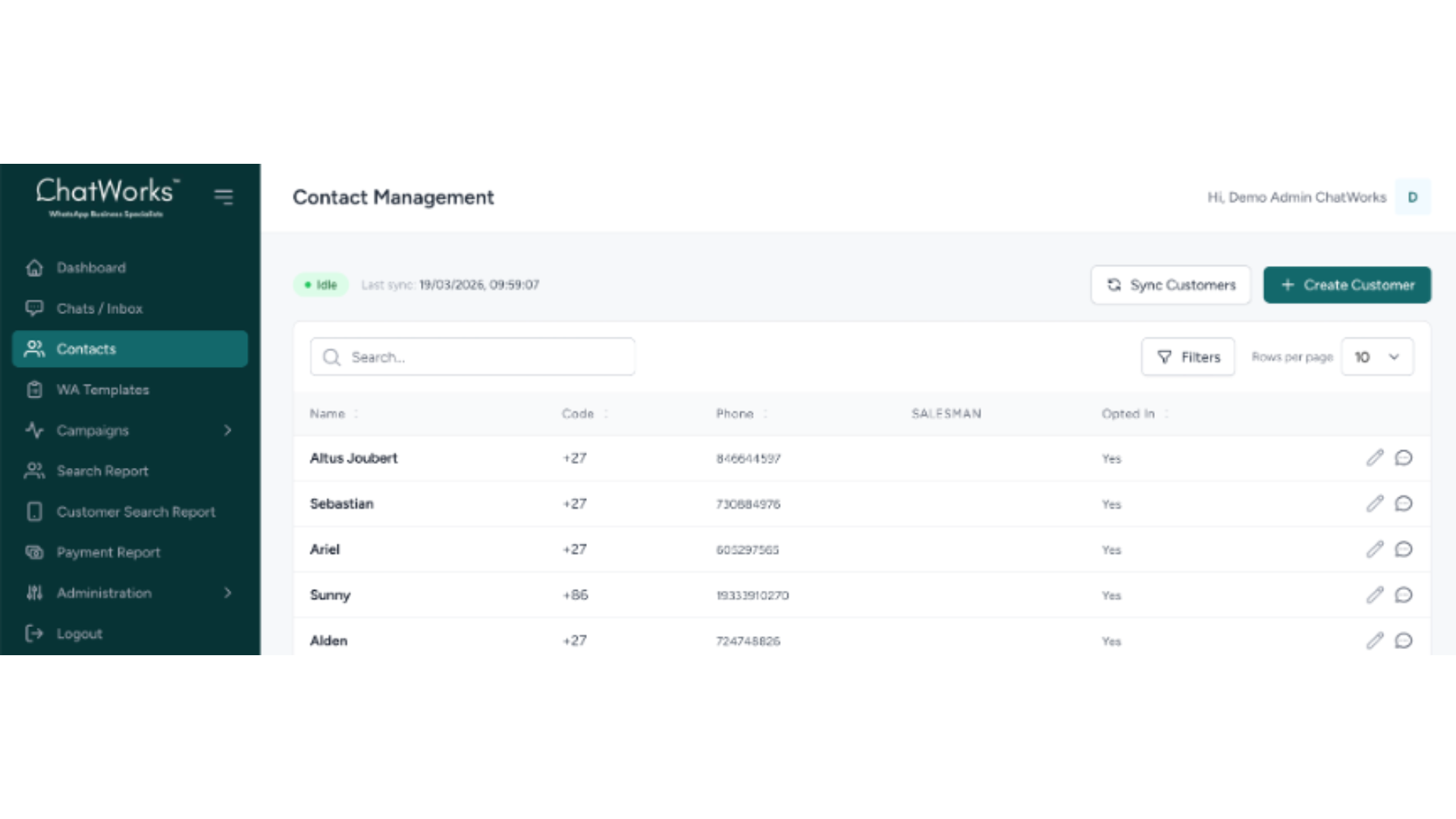
When you do click on a contact, you get their full activity history, a complete log of interactions, and the ability to add internal notes that keep your team aligned. Whether it’s flagging a VIP customer, logging a follow-up, or recording an important conversation detail — it’s all there, permanently attached to the contact record.
You can also sync customers directly from your existing system and create new customers on the fly — keeping your contact base current without any manual re-entry of data.
3. WooCommerce Search Intelligence — See What Your Customers Are Looking For
If your business runs on WooCommerce, the ChatWorks Portal gives you a powerful competitive advantage: real-time product search data from your WhatsApp conversations.
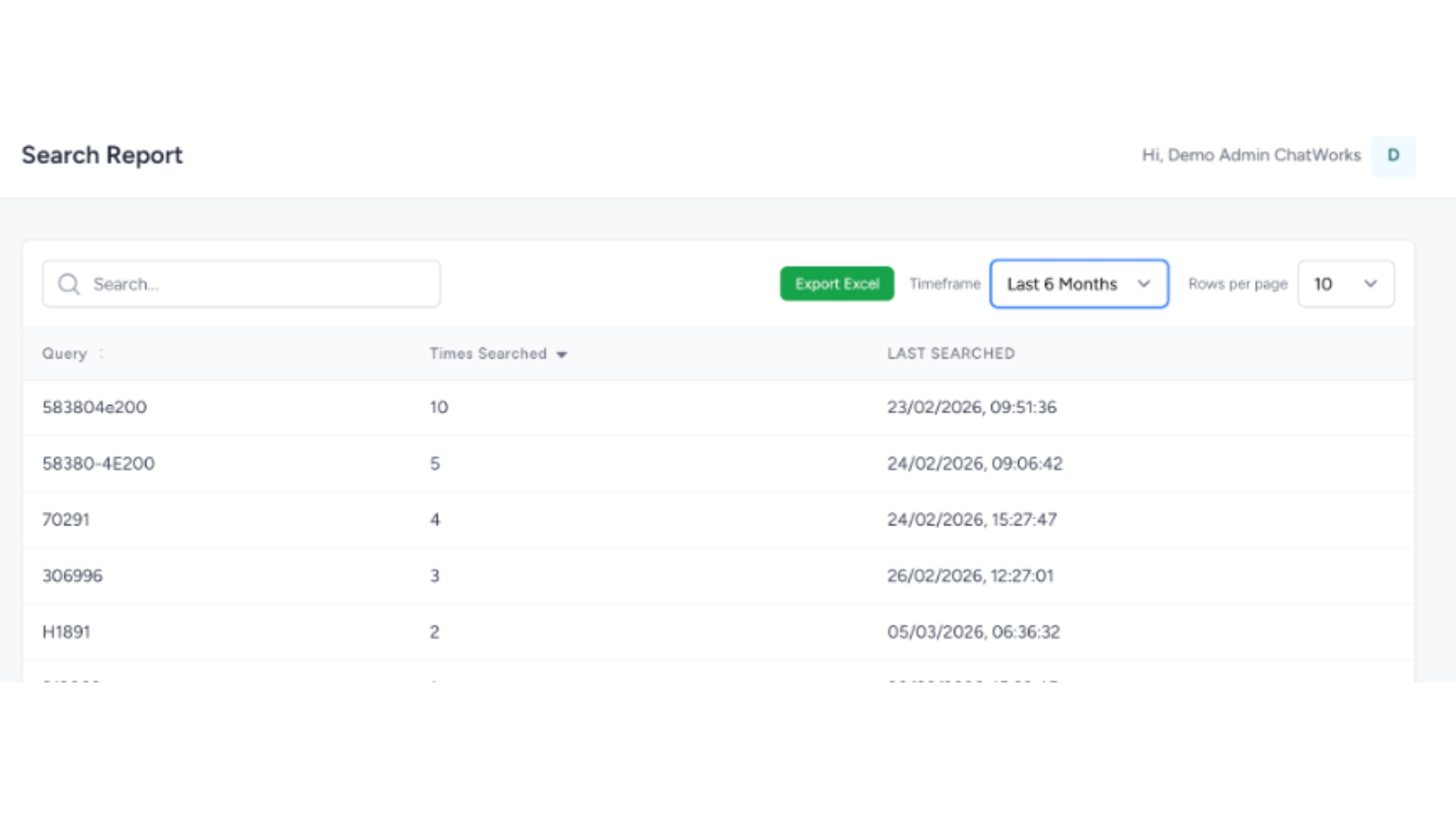
The Search Report shows you every product query your customers have searched for via WhatsApp, ranked by frequency, with timestamps showing when the last search occurred. This means you can instantly identify which products are in highest demand, spot emerging trends before they peak, and prioritise inventory, promotions, or follow-ups accordingly.
The Customer Search Report takes this a step further — linking each search query directly to a named customer and their phone number. You can see exactly who searched for what, how many times, and when. This kind of granular visibility transforms your WhatsApp channel from a passive chat tool into a rich source of customer intent data.
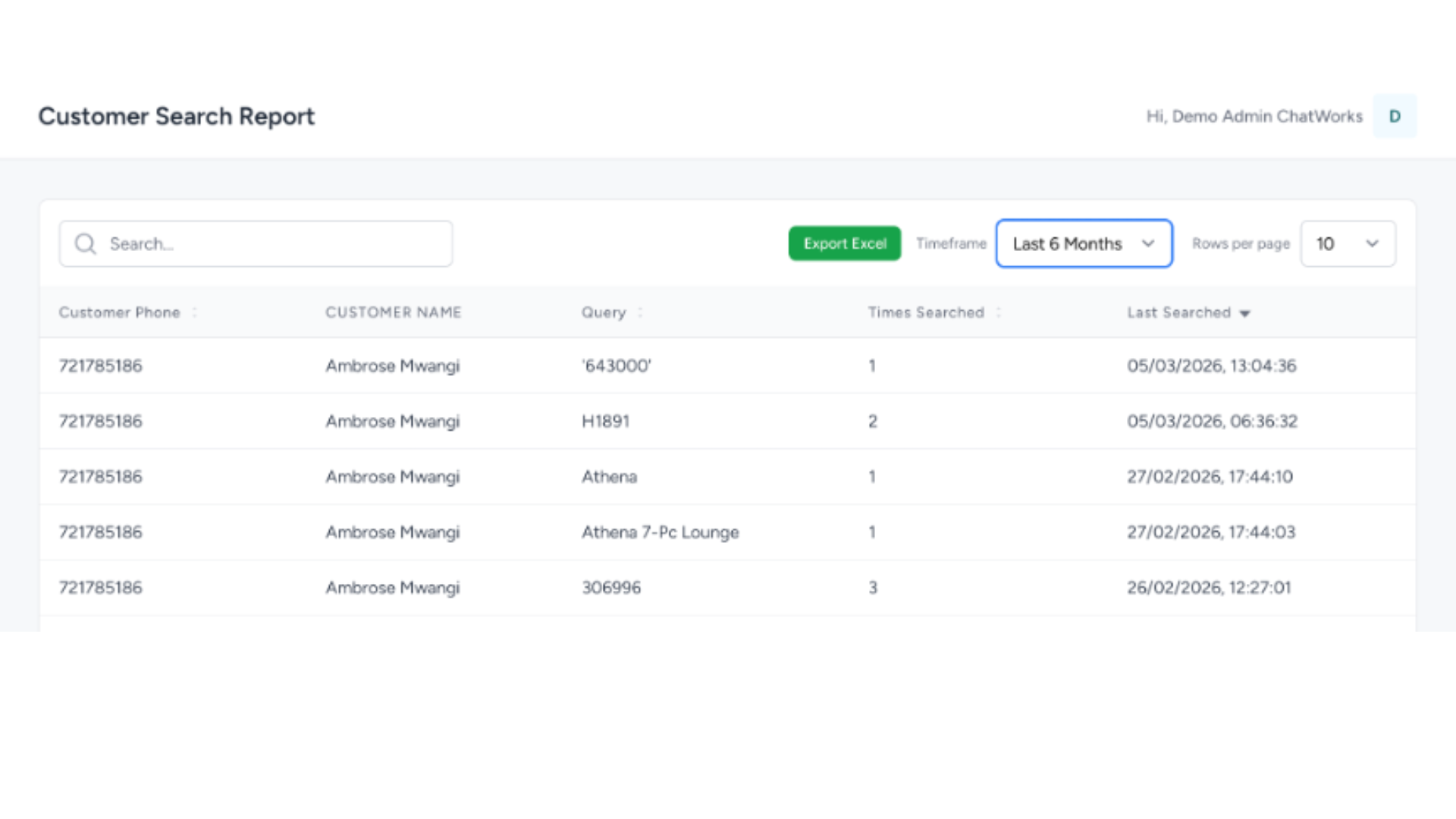
Both reports are filterable by timeframe, searchable, and exportable to Excel — making it easy to share data with your sales, marketing, or buying team without them needing portal access.
4. On-the-Fly Payment Links — Generate Secure Payments During the Conversation
One of the most powerful features in the ChatWorks Portal is the ability to generate secure payment links instantly — right in the middle of a WhatsApp conversation — using our Peach Payments integration.
No switching between systems. No sending a separate invoice and hoping they follow the link later. You simply enter the amount, an invoice reference, and any optional notes — then hit Generate Link. The link is sent directly to the customer via WhatsApp, tied to their contact record, and tracked immediately in your Payment Report.
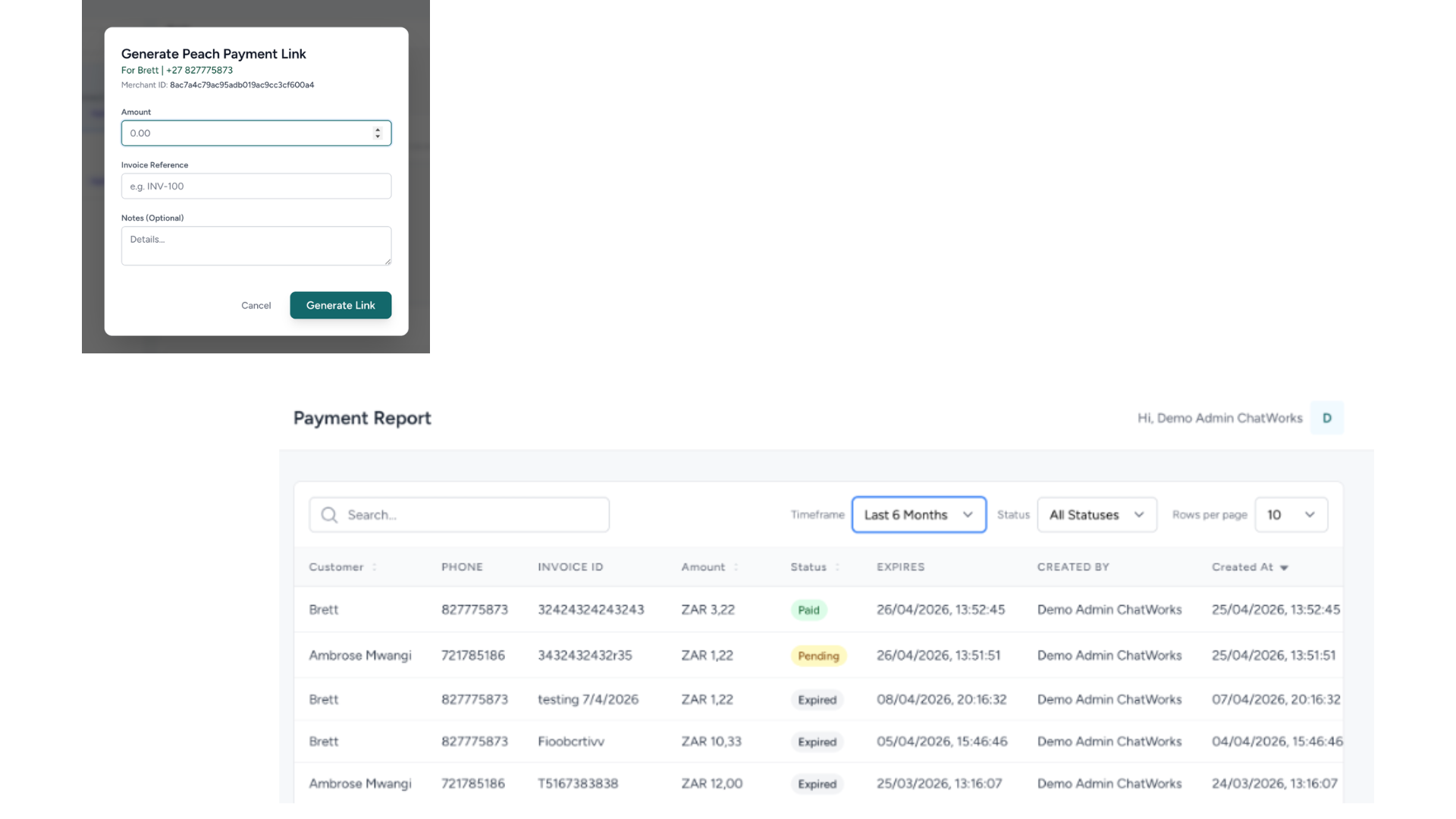
The Payment Report gives you complete real-time visibility over every payment link generated through the system. You can see the customer name, phone number, invoice ID, amount, current status (Paid, Pending, or Expired), expiry date, and who created the link. Filter by timeframe or status, search by customer or invoice, and export the data as needed.
No more chasing payments manually. No more uncertainty about whether a customer has paid. The answer is always right there.
This Is Just the Start
What you’ve seen here is the current foundation of the ChatWorks Portal — and it’s already operational, already being used, and already driving measurable results for businesses across multiple industries.
But this is genuinely just the beginning. The ChatWorks platform is built to grow with your business — more integrations, more automation, more intelligence — all within the WhatsApp channel your customers already use every day.
- Live Dashboard with full operational visibility
- Smart Contact Management with structured list views and full activity history
- WooCommerce Search Intelligence — understand what your customers want in real time
- On-the-fly secure payment links via Peach Payments
- Real-time payment tracking with full status visibility
This isn’t just messaging. It’s structured communication built for operations, visibility, and scale.
Ready to Turn Your WhatsApp Into a Business System?
If you’re already using WhatsApp in your business, the next step is turning it into something that actually drives results. ChatWorks gives you the platform, the tools, and the integrations to make that happen — starting today.
Get in touch with the ChatWorks team and let’s show you exactly what the portal can do for your business.